15-05-12

As I mentioned in a previous post, I’ve spent the last few weeks working with a product called Login VSI. What does it do? Well it essentially forms part of a virtual desktop deployment toolkit in the sense that it helps to benchmark performance of a VDI or SBC (Server Based Computing, such as Remote Desktop Services/Terminal Server) environment and essentially provide accurate end user performance metrics (OS and application response times) to outline the “tipping point” in performance of a VDI deployment.

For those who’ve already done several VDI deployments, you’ll already know the level of detail (and in some senses, educated guesswork) that goes into designing a solution. The types of questions posed include :-

– How many desktops do I need?

– How many IOPS do I need?

– How many physical disks do I need to provide the amount of IOPS?

– What sort of user metrics do I have from desktop assessment phases of the project?

– What are the requirements on the network fabric?

There are a lot more questions along similar lines, but all are important in the design of the solution to ensure it is fit for purpose. Once all numbers have been crunched, a design comes out of the other end that we hope will cut the mustard when it’s put into production.

Login VSI can help in this instance because it simulates users logging into the SBC/VDI environment and performing tasks expected of end users. As such, there are several pre-defined workloads that can be used to simulate real life examples. For example, the medium workload (which comes with the free licence) simulates a user logging in, browsing their Outlook mailbox, manipulating a Word document, PowerPoint presentation, Excel spreadsheet, PDF document, ZIP archive and website browsing with a Flash component (Kick-Ass trailer, which is a very funny movie if you haven’t seen it already!). Timers are built into the process to simulate random wait times when a user drinks coffee, sends a text or talks to a colleague, for example. There’s nothing so random as a human being, so it’s not precise but it does represent a “scattered” workload as you’d see in reality.

LoginVSI Architecture

The refreshing approach from Login VSI is that you don’t need to spin up a SQL Server to capture your performance metrics and environment configuration (don’t you just get tired of having to commission a SQL box every time you need to fart?). This means that as well as reduced initial cost, the complexity is lower and the time to be up and running is reduced. All you need to provide are four elements :-

– LoginVSI Share (can be anywhere on the network, but must be reachable and writable by all devices used in the test)

– Login VSI Launcher (Windows machine that can be physical or virtual, which essentially performs the logins and spawns the test workloads)

– Login VSI Target (Windows machine that has MS Office pre-installed, along with some other tools such as Flash Player, BullZip, Internet Explorer)

– Active Directory (a Login VSI OU is created, along with a Group Policy Object and some scripts that get copied into the NETLOGON share)

The good news is that you don’t need to rummage around dusty corners of the internet to get these tools, each of the four parts above some with their own installer. A handy graphic lifted from Login VSI’s website below illustrates the simple architecture of the product :-

Login VSI Environment Overview

LoginVSI Configuration

One thing that caught me out was that my VSI Share was on a Windows 7 machine. This would be fine on a  very small scale, but I was caught out by the fact that Windows 7 shares do not permit more than 20 simultaneous connections. Login VSI exhibits the behaviour that the target sessions starts and the user logs in, but the desktop just sits there and does not spawn any application sessions. This had me confused for quite a while as there are no error messages as such. If you go to one of the stalled desktops, unlock KidKeyLock (by typing vsiquit) and type in the UNC path of the VSI Share in Start | Run, you will see an error about the number of concurrent connections to a Windows 7 share. Save yourself a lot of time and put the VSI Share on a Windows server or Samba share!

In a VMware View or XenDesktop environment, you need to run the target setup routine on your master image before you spin up a desktop pool/catalog. This ensures that all of the desktops to be tested have all the appropriate software installed. You also need to ensure you have Microsoft Office installed in advance. Any version from 2003 upwards is fine, but if you’re testing Office 2007, it’s recommended to install SP2 beforehand, as there are some known issues with Outlook that are resolved by this patch.

Once you have your VSI Share, your launcher workstation(s) (each launcher will take a maximum of 50 targets, though my testing tended to work better with a maximum of around 35) and your targets, you’re pretty much set. The next stage from here is to configure your environment using the Management Console. The main points of interest here are configuring the launcher names and configuring the workload settings, such as workload type (light, medium etc.) and also peripheral settings such as the Microsoft Office version (if the wrong version is listed, this can prevent the automated workload from running successfully). The management console itself is pretty straight forward and self explanatory.
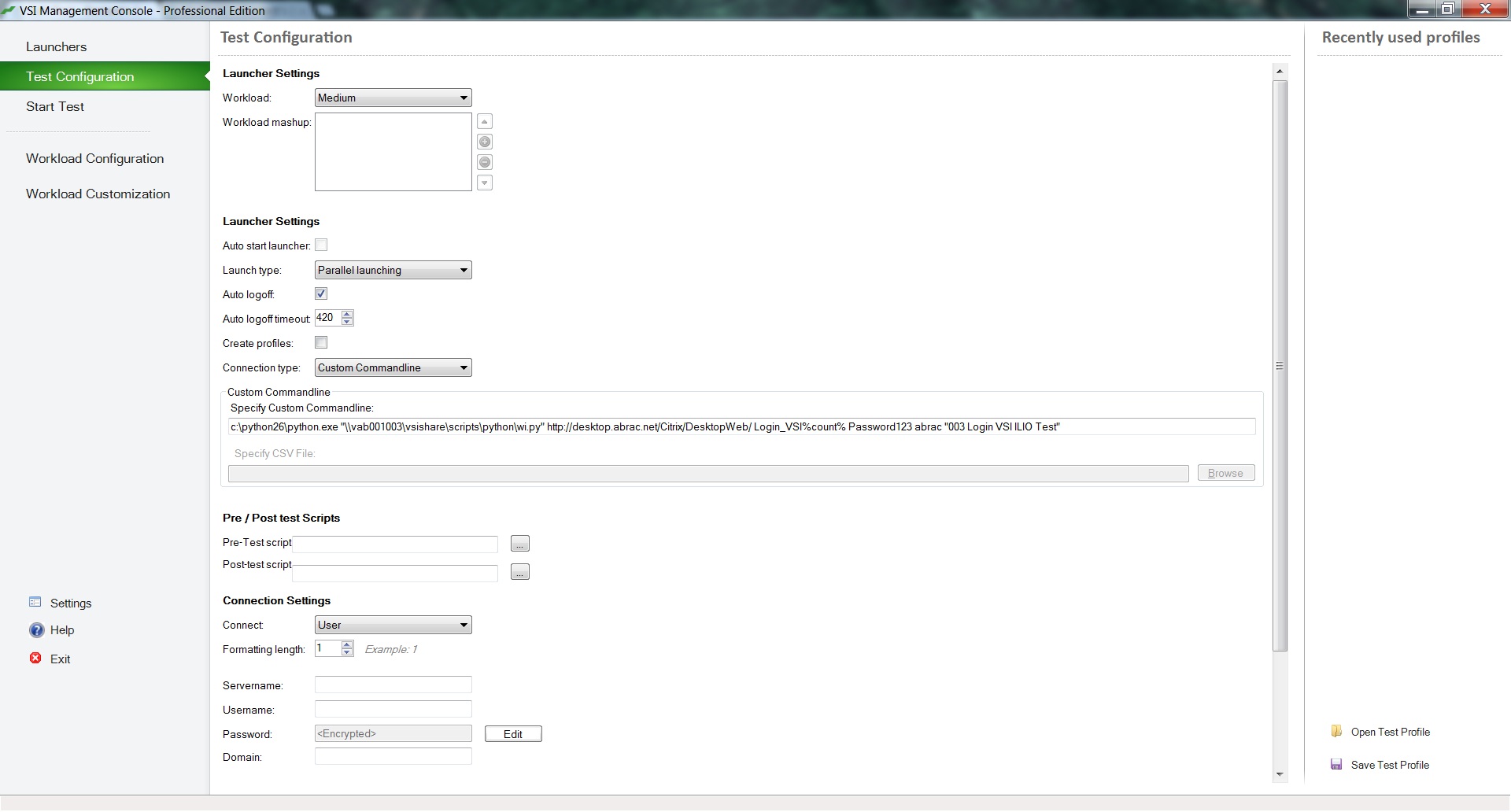
Configuring the connection string, number of sessions etc.

The screen shot above shows the test configuration. This is where the workload type is selected (Light, Medium etc.) and also connection settings to the VDI environment. As you can see from the above screen shot, Python is being used to connect to a Citrix XenDesktop web interface. This is because the login screen for Web Interface had been customised, and the Citrix connector for Login VSI could not recognise buttons on the screen such as login and selecting the available desktops. Citrix themselves provide some Python scripts to provide connectivity and these work just fine. In a View environment, the existing Login VSI connector would probably work just fine, as would a “vanilla” XenDesktop environment.

The next step before actually getting to the testing phase is to define your launcher machines (use the Windows NetBIOS name, rather than a DNS name or IP address, or you’ll likely see a few errors) and configure what settings you want for the workload itself. In my experience, the only setting you really need to look at is the Office version string, so 14 for Office 2010, 12 for Office 2007 and 11 for Office 2003. The screenshot below illustrates the settings.
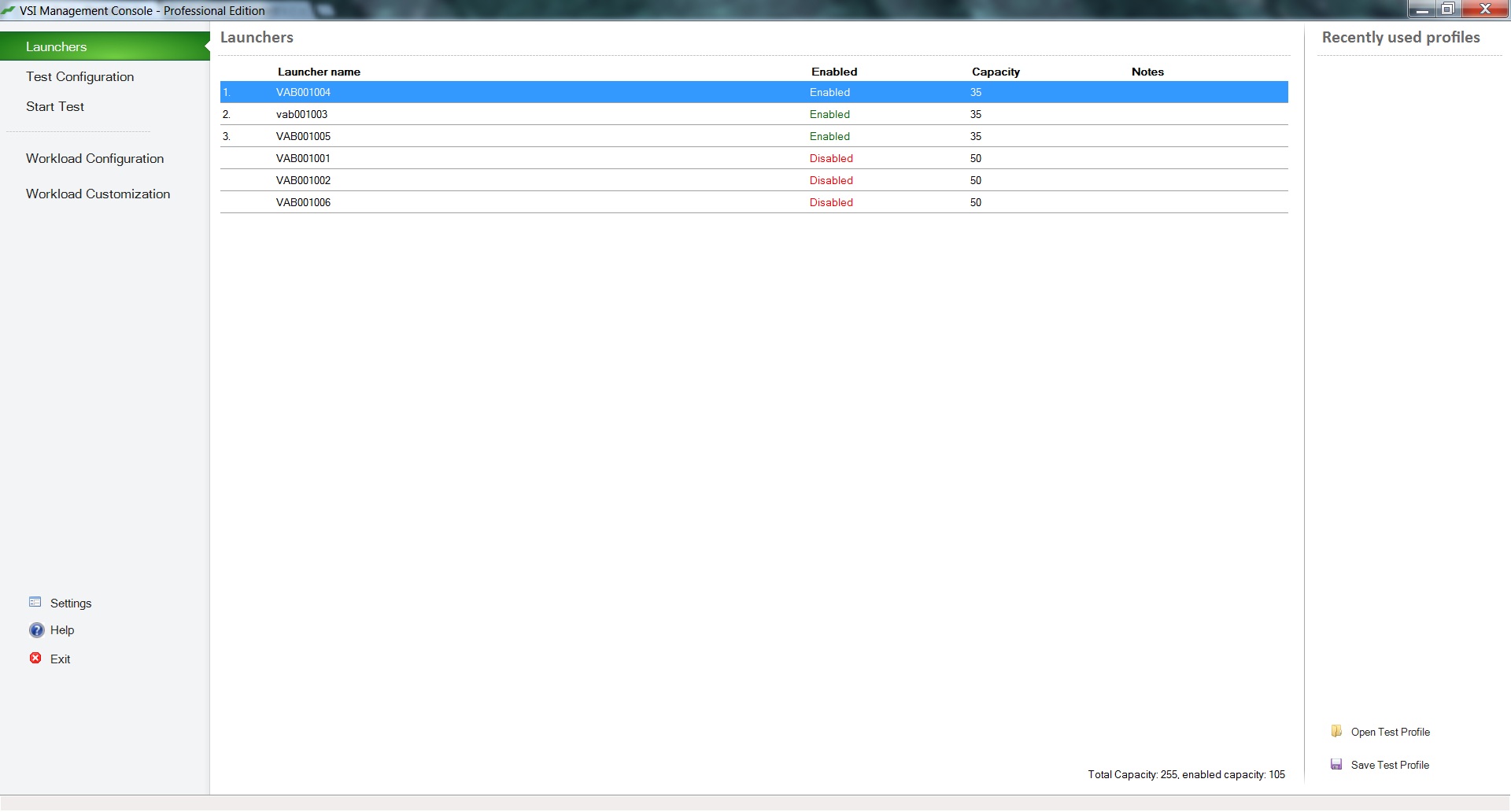
Defining the launcher workstations in the Management Console
Defining the workload settings in the Management Console, including the Office version string.

Further Steps

You also have the option of creating custom workloads, but this is not something I have experience of and to be honest, not something I really had a need to use. If you just need some general benchmarks from your VDI environment, the Medium workload is recommended and used by most vendors when they produce performance white papers for their VDI solution (See Microsoft, Citrix and Equalogic for examples).

At this stage, I’m not going to get too invested in the nuts and bolts of how the whole process works, but needless to say if you’ve got this far, you’re pretty much ready to go. None of the workloads require access to the internet, nor do they require a connection to an Exchange server or any other network location. All workloads are fully isolated and self contained. If you’ve done all the setup and configuration successfully, you’re now at the stage where you can actually run some tests. Consult the Login VSI documentation for session specific settings, such as number of sessions, time delays between starting sessions (try and make this value sensible, so you don’t saturate your VDI hypervisor within a few minutes of starting the test, although if you’re simulating an academic environment, this may be important to you).

Once you’re ready to start the sessions, you should have the launcher agent running on your launcher workstations (a command prompt box that pings the VSI share for work to do) and all target machines spun up and ready to be logged into. In part two of this blog, I’ll tell you more about how to interpret the results. Stay tuned!


04-05-12

I’ve been in new new role with Xtravirt now so seven weeks or so now, and it’s interesting at this point to take a quick checkpoint and look at what I’ve observed already. I’ve been in the End User Computing game for some 14 of the 16 years I’ve been in the IT industry, in fact, it wasn’t even called EUC back then. I think the euphemism was something like “bloody end users!”, but of course we live in enlightened times these days, and we have to give them a more businesslike moniker.

The point is that EUC now is primarily a virtualised environment. Since I started my new role, I’ve been exposed to XenDesktop, XenApp, Login VSI and a whole raft of other tools. The interesting thing about the “new” EUC space is that it forces you to turn traditional desktop approaches on their heads. For example, Windows is written based around the fact that it usually has a local disk all to itself, that it can thrash to it’s heart’s content, without having to worry about running into other resources trying to land grab from it. In a virtualised EUC environment, this is no longer true. There can be several dozen virtual machines booting at once, logon storms, anti-virus scans and a whole batch of other processes going on simultaneously that are competing for the same disk resource.

Additionally, in the days of server consolidation (the phase 1 of mainstream virtualisation, if you will), capacity planning tools such as VMware Capacity Planner or PlateSpin Recon would be set up to capture performance metrics from physical servers, to essentially baseline what CPU, disk and memory resource was being used, so that the virtual equivalent could be appropriately sized for performance. In the EUC space, this is no longer sufficient. As well as capturing the previous metrics, we also need to look at additional detail based around the end user experience. If logon to a server console is slow, generally no-0ne but the admin would notice, and as frustrating as it might be, it’s generally tolerated and goes unreported. In the EUC world, when several dozen users logon at the same time and experience is degraded, IT will get to know about it pretty quickly.

As such, the likes of Login VSI help to determine the performance of the EUC experience using real world examples such as Outlook, Flash and manipulation of large spreadsheets. Traditional capacity planning tools are very useful for obtaining basic figures on specifications, but lack the insight to analyse application performance and the impact on a virtual desktop environment.

Away from such matters, it’s also interesting to look at applications. As I remarked at a BrainShare event presentation several years ago (before iPads and VDI in 2007), the apps drive the platform, not the other way around. Generally, users don’t care if it’s Mac, Linux, Windows, iPad, Android or Etch a Sketch, as long as they can get access to their line of business applications in a usable manner. The underlying layer of the OS generally just becomes another commodity item. I didn’t think I was being particularly visionary back then, just a pragmatic view based on the way I approached things as an end user.

Whilst enterprise applications such as Microsoft Office come with tools for the virtual environment, many core business applications are written in house and are proprietary to the business. As such, they tend not to have enterprise deployment tools, have extensive user communities or knowledge bases, and are written on the “good enough” principle. Again these apps are written with the assumption that the endpoint is a largely static thing, that the hostname doesn’t change and that it never moves around the network or across continents. In the virtual EUC space, this is no longer true and we must now be creative into fooling the app into thinking it’s still living in the traditional desktop environment.

It’s been seven weeks of change, steep learning curves and a change of thinking, but I’m enjoying every minute and it’s certainly the challenge I was hoping for.

13-3-12

Yesterday was my last day at NDS8. I can’t believe it’s been a little over two years since I decided to have a go at life on the road in consulting. It’s been a fun and tiring time, and I’ve learned so much. Not just about technologies, but about project management, business process, other people and mostly myself. I’ve managed to get customers out of some of the strangest of scrapes. I’ve worked late and travelled during my own time at weekends, just so I can turn up bright eyed and bushy tailed at 0900 on Monday morning so that the customer is left with a positive impression.

So why the move? Well it’s something I’ve been thinking about for a couple of months and an unbelievable opportunity came up that I simply could not turn down. From Thursday, I will be employed by Xtravirt Consulting, who are VMware’s EMEA Consulting Partner of the Year 2011. As I remarked to them at my interview and without being sycophantic, this to me is the Champions League of virtualisation jobs. It will take me in a direction far beyond where I am now, making me a far better consultant and giving me some real cutting edge technical skills.

It’s no great secret that the Novell space is shrinking and I’ve been really into virtualisation for years, cloud in the last 6/9 months. I’ve had the privilege of attending VMworld EMEA, and just seeing what a vibrant community of partners, vendors and customers has sprung up around VMware just made me want to be a part of it. It’s where all the innovation is happening right now, and the pace of change is electric. It also means I’ll get a lot more involved in things like storage design, which up until now, had only been at a high level.

In this business, if you fail to evolve you soon get left behind and I’m determined that won’t happen to me. I’m excited, nervous and slightly intimidated about my new role, but that’s how it should be as it will put me on my toes and keep me there!


08-11-11

For those looking for it, here is my response to Virgin Media’s “Did we answer your question? How are we doing?”, which was too long to publish on Facebook, Twitter or anything else pithy :-


It’s usually a joy to ask a question as one finds the customer service representative doesn’t read it before ploughing headlong into an answer. I’d love to engage them in some badinage and spend three hours re-iterating my initial (simple)question, but I worry life is too short. I still feel that offshoring customer service to India is a fundamental mistake. 
 
They’re polite and courteous, but don’t understand spoken English nuances and it’s a problem that won’t go away until CS returns to the UK. You may think you’re saving company pennies doing this, but it doesn’t help customer loyalty and despite everything, has not improved customer service. I’d wager your budget would be better spent hiring a few of the millions unemployed in the UK to provide a better service at probably the same cost.
Of course I open myself to accusations of racism, but we know in our heart of hearts this isn’t true. It’s generally an excuse peddled by the lazy, who don’t wish to engage in meaningful discussion on the topic. I’ve been to India and they’re wonderful people with a fantastic work ethic but offshoring customer facing operations has been fundamentally flawed from the outset, a fact only a handful of UK companies have grasped.

I’ve opined similar sentiments on previous occasions only to be met by a standard corporate response. I’m happy you’ve read this far, so there is no need really to follow up further. Hopefully it’s entertained as well as informed. This is my raison d’etre!


01-11-11

So the week  before last was spent in the delightful (but blinking expensive) city of Copenhagen. I was there to attend my first VMworld, and what an interesting week it was. I’ve been fortunate enough to attend a couple of Novell BrainShare events (well four in fact), but the scales are completely the opposite. I don’t think I’m inviting any criticism by saying that the two vendors are at opposite ends of the spectrum – Novell’s fortunes have been on the wane for several years, whereas VMware is an industry (and Wall Street) darling on the relentless rise quarter after quarter.

The purpose of the visit was really twofold. Firstly to network as a VMware partner, to see how we can really go out to market and sell VMware solutions and secondly with my technical head on, trying to re-learn my VMware skills that have gotten pretty rusty over the last couple of years. As such, it was a pretty good success. The problem with any event that has 7,000 delegates is that you’re always going to have a hard time spending any “quality time” with the people who have the answers. Getting the opportunity to talk to the subject matter experts in the exhibition hall is not an easy task!

The main thrust of the event was to showcase VMware’s cloud message. I used to hate the expression and all it stood for, as it stands for everything and nothing. Ask 10 vendors their take on cloud computing, and you get 10 totally different replies. In VMware’s case, it’s been a clear, concise and consistent message for the last couple of years. To them, cloud computing is essentially an agile environment where IT is turned into something akin to utilities such as water, gas and electricity.

In the VMware world, you can build an internal cloud that can expand and contract as load and business requirements fluctuate, or you can offload all of your VMs to a public cloud, such as the one from vCloud partner Colt, or you can have a Hybrid Cloud of the two, where you keep all your important business IP and services on premise, but when occasional spikes in demand occur, you can spin up some extra capacity at a vCloud partner, but still have it as part of your infrastructure. Once the spike falls, you tear down the VMs in the public cloud. I must admit, the more I’ve been thinking about this idea, the more I like it. As I said, it’s been the same message for the last couple of years and it’s an easy one to conceptualise.

On a slightly different track, I went along to a Scott Lowe session for the first time. He’s well known in the VMware space and has written numerous books and articles. What made his session interesting was that for once, it wasn’t too preachy or numbers driven. It really followed the process of how to design a vSphere implementation from the ground up. Rather than concentrating on raw numbers (which many do), he turned it around completely and asked to look at it from the business perspective. I really liked this approach, as even now, technology solutions end up being a square peg in a round hole and the business has to flex to fit it, rather than it being a business based solution that technology can help with.


18-05-11

Much has been said and read about Cloud Computing in the last few months, I think my over reaching comment on the whole scene is that it’s the usual IT Jedi mind trick  – one solution/one vendor/both can solve all your IT problems. I believe it pays to retain a degree of cynicism around anything IT people say, as they usually mould a technology and then wonder how best to fit it around you, rather than the other way around.

I think there’s also the automatic reaction from CxOs that shifting IT costs under a single “outsourced” line on the profit and loss sheet makes sound fiscal sense. I don’t believe that’s true for a second. There is room for Cloud based services with no residual business value (a University’s student e-mail is a fine example, or maybe a corporate blog), but in the case of commercial data and intellectual property, I’m no more likely to park my car on someone else’s driveway than I am dropping gigabytes of data onto someone else’s data warehouse a couple of thousand miles away.

The single point I want to make in this posting is that shifting your core IT services into someone else’s domain is fraught with problems. Recently there have been high profile outages with both Amazon and Microsoft BPOS, leaving customers with a degraded (or non existent) service for hours, days and weeks. Let’s be clear about one thing – when IT services are kept “on prem” (yuck) or in house, outages happen all the time. Even with SLAs, SLSes and the like. Shit breaks, it’s a fact of life.

Now then, go back and re-read those articles I posted above. What do they both have in common? The fact that customers were not kept informed about what the issue was, when it would be fixed and what they would do post mortem to mitigate similar failures in future. I believe this is the one area where in house IT triumphs. In a previous life of running centralised, high profile IT services, I always tried to communicate what was happening during failures and how long we thought it would take to fix it. I didn’t always get it right, but I made a big effort and I’d like to think people appreciated it.

With in house services, there’s always an arse to kick. You always know specifically whose arse to kick and the buck didn’t stop with a faceless multi national company with a call centre out the back of beyond. You can call a mobile number and speak to the technical person who’s standing over a smoking server. You can offer your support (however limited that might be). You can pat them on the back when they recover the service against all odds (server rooms with 3 inches of water on the floor, power cables hot to the touch) and you can sit them down to talk over how to prevent happening again.

Much is said about communication. Less is said about the lack of it. I think the inherent strength of in house IT is the ability to directly communicate with the people who build, maintain and in some cases, love the services they provide. As soon as you sign the contract to put any of that infrastructure out of the door, it’s an automatic slap across the face for your IT people. As a result, they’re less likely to go that extra mile to love that cloud based service, not least because getting to it is obfuscated by layers of bureaucracy at the vendor end.

Yes, cloud computing has it’s advantages. We’ve been using the cloud before we started calling it that. Hotmail, GMail, Dropbox, X Drive. etc. There’s nothing new here, someone just invented a fancy name for it. Remember though that once you’ve opened the door to cloud based core services, you’re making a fundamental shift in your philosophy. Just make sure you’re fully informed before you do that. In house IT may cost that bit more, but some things are worth more than just a few hundred quid.

13-02-11

I hadn’t realised it was so long since I last blogged. I feel the need at the moment due to my recent trip to India with work. I’m often on the road as part of the job, but every now and again fate deals you a great hand and you get to see things most mortals don’t. As such, I was invited to Novell’s India Developer Centre to meet the guys and gals who write ZENworks. For those not in the know, just be aware that it’s the vast piece of software I go around installing and cajoling the most 😉

I was extremely apprehensive before I went. I’ve only been outside of Europe a grand total of three times, and that was to head strictly west to North America, not east towards countries less well off than our own. That said, the journey did start with a trip on an Airbus A380, the largest passenger jet around. I was excited about this, as there aren’t too many around. Don’t think I’m being glib when I say it’s just like a plane but a lot bigger. I was a bit underwhelmed by the whole experience, but it did have really cool touch screens in the back of the seat with movies on demand, so I decided to watch “Unstoppable”, “The Expendables” (much better the second time around, though butchered for sensitive Arab audiences) and half of an amazing documentary called “Inside Job” (more about that later).

As you can’t get directly to Bangalore from Manchester, we had to go via Dubai. We got there about 1am local time, and I was surprised to see much huge crowds of folks around the terminal building. Apparently the place comes alive at night, and this was true. I also got greeted by the VIP service, who got me through a security fast lane, which was a total blur. Both times they met me (going out and coming back), the lady greeting me called me “Mr Chris”, which I found amusing in a cute kind of way!

The thing that struck me most during the week out there was that the Indians are lovely people who are almost congenitally nice to strangers. I don’t like talking down to people and I don’t like them talking down to me. I like to treat everyone as equal, but it was an odd sight to see hotel staff stop in the corridor as you approached them, put their hands behind their back and say “Good Morning/Afternoon” etc and not move until you passed them. I’ve stayed in hotels all over the UK and been called all kinds of things – “mate” “pal” (my least favourite, it has to be said) and I think I even got a “Guv” once in London, but in India it was always “Sir”.

The other thing that struck me is that although there is a lot of squalor and under privileged living, people just seem to get on with it. The roads are barmy, and lines are very much for illustrative purposes only. We went to the Bull Temple, which is a big deal for Indians. When local kids in there saw that we were UK and US tourists, they treated us like rock stars, wanting to shake our hand and say hello. All very affable, and not threatening at all. We did get besieged by beggars outside, and giving them 10 rupees made them eternally grateful. When I say that it’s 70 rupees to the pound, this gives you a bit of an idea of what the standard of living is like.

Kids play on mounds of rubbish and the rubbish trucks drop their loads on the side of the road wherever there is a gap – no separating paper, bottles and garden waste here!

There’s a lot more to tell, but if you’re interested in the rest, head over to my Flickr set

04-Sep-10

I often remark that in order to be a good photographer, you have to have an eye for a good shot. I don’t think I have this, but every now and again, inspiration strikes. I’m especially pleased with this shot of a Scottish sunset, taken earlier this week…

24-08-10

What makes a good leader?

I thought long and hard about this post – many miles rode on the bike and many laps of the swimming pool. I felt inspired by memories of Churchill speech anniversaries and somewhat conversely, the many digital column inches in the IT press dedicated to the HP/Mark Hurd saga. It got me thinking, what makes a good leader? I’ve also become unashamedly addicated to Undercover Boss on Channel 4!

It’s true that if you ask 100 people that question, you’re sure to get 100 different answers, because every employee or group member responds to a different personal stimulus. Some people are “kick up the backside” people, and some are “arm around the shoulder” people. Of course there are all kinds of subtle shades of grey in between. That said, you’ll probably find a number of places where a wish list of leader’s personal attributes overlap between one person and another.

I’ve worked for all kinds of leaders so far in my career. Some were hands off, some were hands on. Some were calm and collected, others edgy and moody. Some were great communicators, others you literally didn’t see for weeks on end. I personally prefer the “hands off” approach, because I’ve enough self motivation and discipline to get on with it, but others prefer to be pushed. Let’s take a look at some of the things I’ve observed in my career so far…

“My door is always open”

This is a corporate favourite. The CEO or other C-Level executive tries to connect to the wider workforce by giving the impression that their office door is always open for employees to come in and express their views on how things can be improved for the greater good. This can and does work well in smaller companies, say 70 or less. A company of this size is still small enough to be relatively personal, and generally you find most employees know everyone in the company, so this can work.

However, in larger companies, my experience tells me that this can be potentially divisive. In organisations upward of 500+ people, there are teams, organisational divisions, layers of middle management that can vary in depth. The point here is that a low ranking member of the workforce strolling straight into the CEO’s office with some blunt recommendations for improvement (or to voice concern over some middle management decisions) can mean that already the chain of command has been circumvented. The next thing the middle manager knows, he’s in the CEO’s office being grilled as to why productivity or quality levels are falling, or personal relationships have become strained.

By “leaving the door open”, the CEO has created  a perfect storm of giving an unhappy employee a direct route to the top and cutting out the very structure that’s put there to ensure issues are dealt with quickly, quietly and informally. If you’re going to use this ideal, be careful how you use it, and don’t create additional problems when you’re trying to nip them in the bud.

Go back to the shop floor once in a while

If there’s one thing leaders can be guilty of, it’s that they can end up being enclosed in a management bubble. That’s usually through no fault of their own, but they tend to look at the much larger picture. How do we fit into the market? How is the quality of our product or service? Is our marketing message getting through? How can we reduce costs and improve cash flow?

By going back to the shop floor, CEO’s can gain immediate respect from their employees because they roll up their sleeves, get their hands dirty and see what the daily issues are. I’ve always said that a company’s #1 asset is it’s employees, but it’s unfortunate that sometimes organisations see their employees more as a hindrance than the engine that drives a company. Undercover Boss has shown me that workers at the “coal face” generally have great pride in their work and have pride in the brand they’re representing. They often go over and above the call of duty for the customer by working longer unpaid hours, performing additional tasks to make the customer happy and generally developing personal trusted relationships with the customer. Latterly, this removes the layer of “us and them” and the customer sees the supplier as a friend and not someone to be treated at a distance.

I remember several years ago, my head of section promised to spend time on the shop floor, just to see first hand what happened at each site on a daily basis. This would remove him from his bubble, promote positivity within site staff and also mean that he could speak to customers face to face and find out what they liked and didn’t like about what we did and how we did it. I noticed several interesting things from this commitment:-

– Site manager’s initial reactions were one of scorn. “He’ll never do that”, “he doesn’t have a clue what we’re faced with” etc

– The section head was visibily nervous at the prospect and did not inspire confidence he would follow through on the commitment

– He gave off the impression (to me at least) that his “bubble” provided a security blanket he could not live without

– He did not provide firm dates for visiting sites, did not interface with site managers on what his tasks would be and did not outline mechanisms for how he would feed back what he saw

From the above, we can learn a few key points:-

– Make the commitment to work on the shop floor, wherever that might be (even if the site is not a commutable distance)

– Provide firm dates on when you’re going to go (preferably within the next quarter, not “sometime early next year” etc.)

– Ensure the time period on the shop floor is sufficient to see many different customer/employee scenarios (ie. a week, not one or two days)

– Notify site/middle managers of your intention to feed back your observations at the earliest available opportunity, detailing the framework you’ll be using to do this (one to ones with managers, larger meeting of all managers, written reports and feedback of wider issues up the management chain to the board, if appropriate)

– Don’t be afraid to criticise failings if you can do it constructively – no-one wants to hear negative comments, but if the ultimate goal is improvement, employees will buy into the process very quickly

– Provide praise where appropriate too – you will find stories of individual excellence where you least suspect it

– Keep an open mind, without this, the whole process is a waste of everyone’s time

– Rewards need not be massively financial, think about structured training plans using in house resources or give someone a job title that reflects better their experience, skills and responsibilities

– More often than not, organisational or operational tweaks are more appropriate than wholesale changes to make improvements

In my particular example, this section head (to the best of my knowledge) never did follow through on his commitment.I’d like to think that had he done so, it would have been a rewarding experience for all concerned and we would have made organisational changes that would have benefitted all.

“Communication breakdown..it’s always the same….”

Ah, communication. Often talked about, often stressed as vital, often missed completely. But then again, communication is a very expansive term, can we distill it down to make better sense?

We often think of communication within an organisation as flowing from the top down, from the board to the coal face and on things such as “how is the business doing”, “changes we are making”, “why the CEO has a new BMW”. OK, maybe the last point is erroneous,  but think about it, is that what an employee on the shop floor is likely to be thinking about you? Do they feel disenfranchised?

The above example is a common mistake in business. While it is vital to have an information flow from the top down on such matters on how well the organisation is performing, future plans and more, it’s equally important to ensure the flow of information is bi-directional, not uni-directional. How can management improve services without feedback from the delivery mechanism? Some of this refers back to my initial point of “my door is always open”. In a large organisation, ensure your workforce has an up to date organisational chart, so they know exactly who they are responsible to. Middle management is there for a reason, make sure you use it. Otherwise, it becomes needless bloat that reduces efficiency. Should structure changes be made, new divisions or teams created,  make sure the organisational chart reflects this. This way, an employee on the shop floor knows exactly who they should be speaking to.

One company I worked for had a quarterly “all hands” meeting, where all staff came to the head office for presentations from each section head and also from the CEO. I think this worked very well, and for those not present because of holiday or customer commitments, the session was recorded and made available for playback on the corporate intranet. This idea is brilliant and should be used where possible, because:-

– It is regular, and employees know exactly where and when the event will occur

– It is permanent. Even if it’s been a slow quarter, there’s always something to talk about

– Every department knows what the other departments are doing. Sometimes cross-pollination of skills and ideas can occur in an organic way

– It provides employees with an identity of who they are within the company as the engine that drives the business and if their department has had notable success that quarter, the whole business gets to hear about it personally and the section head and CEO can provide praise to those who deserve it – always a massive morale booster

However, on the other hand, there can be pitfalls:-

– Don’t regularly concentrate on particular departments for praise, this can lead to instant divisions (i.e. “This has been our best Sales quarter ever, aren’t Sales great?”)

– Remember the unsung heroes, without whom the organisation would not function. More often than not, these are the internal, unglamourous departments the customer rarely sees, such as the stores department, payroll, development etc.

As well as quarterly “all hands” meetings, it can often be useful to provide something more regular, such as a monthly e-mail or newsletter or a blog from the board that’s updated on a regular  basis. If you’re going to commit to something like this, make sure you do it regularly and you keep it up – employees will come to rely on it.

Remember the small things make a difference!

Whilst company barbeques and white water rafting expeditions are nice, it’s often the small things that make a bigger difference to your employees. To keep them motivated, reward such things like attendance with an £20 Amazon gift voucher (it needn’t cost the earth). Have an “Employee of the Month” scheme where excellence is rewarded and publicised, even if it’s an “internal” employee that customers never see.

Employees often react well to regular performance reviews – if all targets are met over a quarter, why not reward them with some personal improvement time? Or even an extra day’s holiday? Be creative – often the small things make the biggest difference.

Hopefully in my next blog, I can provide some thoughts on middle management and what techniques can make you a better leader. But for now, this blog entry has been by some distance my biggest ever. Please leave any and all feedback, I’d be interested to hear the experiences of others.


22-07-10

Took a whole day yesterday to upgrade my test rig from VMware ESXi 3.5.5 to 4.1 (the new one that shipped a few days ago). As well as having to buy a new network card (I can recommend the Intel Pro 1000/GT – cost me just shy of 30 quid and works just fine), I had to go to 4.01 and then to 4.1. I’m sure there is a more elegant way to upgrade, but I couldn’t figure out what it was. Obviously if you have a vCenter Server, it’s a piece of piss, but if you’re tight like me and have the free standalone ESXi server, what do you do? This is what I did….

So, in a nutshell :-

– Download vSphere client 4.0 and the 3.5.5. -> 4.01 upgrade ZIP

– Install the vSphere client, ensuring to check the installation of the Host Update Utility (or whatever it’s called)

– Once installed, run the Host Update Utility, point it at your ESXi server and the update ZIP file

– This process took bleedin’ ages on my server – seemed to be stuck on 3% for about 20 minutes, but hang in there, it does complete! Took around 40 minutes, I think. Though I wasn’t counting…

– Install the vSphere CLI tool and run the vihostupdate.pl script from the CLI with the update 4.01 to 4.1 ZIP file. This process is much quicker and took but a few minutes.

– Don’t forget to update the vSphere client on your management workstation too.

– If at any point in the vSphere client install/uninstall tangle you get Visual J# errors, uninstall the current one from Control Panel and get the latest one from Microsoft. Even though it’s dated 2007, I think that’s the latest. Solved it for me, anyway.

All in all a whole day burned, but at least it’s done now!!