23-06-16

AWS Certified Solutions Architect Professional – Study Guide – Domain 2.0 Costing

2.1 Demonstrate ability to make architectural decisions that minimize and optimize infrastructure cost

  • Costs can be controlled by using Reserved Instances if the required compute resource is fairly static and predictable – any excess capacity may be resold on the Marketplace. Reserved Instances have three payment models:-
    • All up front (up to 75% discount)
    • Partial upfront (middle discount)
    • No upfront (no discount, but still cheaper than On Demand)
    • Contract length is 1 or 3 years
  • Reserved Instances can be cost effective when the steady state load is known – purchasing RIs to service this requirement and then using On Demand or Spot for bursting can be an effective cost strategy
  • Reserved instances can be modified
    • Can be moved to another AZ
    • Change the instance type within the same family
    • Each instance size has a normalisation factor, which is a unitary value from 0.5 (micro) to 80 (10xlarge)
Instance size Normalization factor
micro 0.5
small 1
medium 2
large 4
xlarge 8
2xlarge 16
4xlarge 32
8xlarge 64
10xlarge 80
  • Spot instances can provide ad hoc compute power but are transitory and can be removed without notice if the spot price goes above your limit
  • On Demand instances run on a “pay as you go” model
  • Legacy apps that have burstable compute requirements are more efficiently run on instances with burstable CPU credits (T2 instances). Useful for legacy applications that do not support auto scaling
  • Instances use CPU credit balance which expires after 24 hours on a rolling basis. When not using full CPU, credits can accrue and be used to periodically burst
  • Instance types provide optimised instances for different types of workloads and may represent the best cost vs performance question when designing a deployment. Types include:-
    • T2 – Burstable Performance Instances – useful for general purpose workloads where CPU usage may need to spike on occasion. Balanced compute/network/storage instance. Lowest cost. Use cases – test/dev, small workloads, code repos, micro instances
    • M4 – General Purpose – Xeon Haswell CPU, balanced compute/networking/storage, EBS optimised by default and has enhanced networking option. Use cases – Small and mid-size databases, data processing tasks that require additional memory, caching fleets, and for running back end servers for SAP, Microsoft SharePoint, cluster computing, and other enterprise applications
    • M3 – Largely as above, but with Ivy Bridge generation CPUs, so one generation back from M4. Use cases – Small and mid-size databases, data processing tasks that require additional memory, caching fleets, and for running backend servers for SAP, Microsoft SharePoint, cluster computing, and other enterprise applications
    • C4 – Compute Optimised – EC2 specific Haswell CPU, EBS optimised by default, support for enhanced networking and clustering . Use cases – High performance front-end fleets, web-servers, batch processing, distributed analytics, high performance science and engineering applications, ad serving, MMO gaming, and video-encoding.
    • C3 – as above, but with Ivy Bridge generation CPUs, lowest price point per GB of RAM, SSD storage and enhanced networking support. Use cases – memory-optimized instances for high performance databases, distributed memory caches, in-memory analytics, genome assembly and analysis, larger deployments of SAP, Microsoft SharePoint, and other enterprise applications.
    • G2 – GPU Optimised – for GPU and enhanced graphics applications. Sandy Bridge CPUs, NVIDIA GPU with 4GB RAM, designed to support up to eight real-time HD video streams (720p@30fps) or up to four real-time full HD video streams (1080p@30fps),  high-quality interactive streaming experiences. Use cases – 3D application streaming, machine learning, video encoding, and other server-side graphics or GPU compute workloads.
    • I2 – High I/O Instances – Ivy Bridge CPUs, SSD Storage with TRIM support, support for enhanced networking, high random I/O performance. Use cases – NoSQL databases like Cassandra and MongoDB, scale out transactional databases, data warehousing, Hadoop, and cluster file systems.
    • D2 – Dense Storage Instances – Haswell CPUs, HDD storage, consistent high performance at launch time, high disk throughput, support for enhanced networking. Lowest price per disk throughput performance on Amazon EC2. Up to 48 TB of HDD-based local storage. Use cases – Massively Parallel Processing (MPP) data warehousing, MapReduce and Hadoop distributed computing, distributed file systems, network file systems, log or data-processing applications
  • EBS volume types are:-
    • General Purpose SSD (3 IOPS per GB with burstable ability, 1 GB – 16 TB) – “Better”
    • Provisioned IOPS SSD (up to 20,000 IOPS per volume, 4 GB – 16 TB) – “Best”
    • Magnetic (100 IOPS, burstable to hundreds, 500 GB – 16 TB) – “Good”
VPC only EBS only SSD volumes Placement group HVM only Enhanced networking
C3 Yes Yes Yes
C4 Yes Yes Yes Yes Yes
D2 Yes Yes Yes
G2 Yes Yes Yes
I2 Yes Yes Yes Yes
M3 Yes
M4 Yes Yes Yes Yes Yes
R3 Yes Yes Yes Yes
T2 Yes Yes Yes
X1 Yes Yes Yes Yes No

2.2 Apply the appropriate AWS account and billing set-up options based on scenario

  • How do you need to handle account management and billing?
  • Consolidated billing provides a way for a “master” account called the Paying Account to be responsible for a number of other AWS account’s bills (Linked Accounts)
  • There is a soft limit of 20 linked accounts but this can be upped by request
  • Advantages of consolidated billing
    • Single bill
    • Easy to track usage and payments
    • Volume pricing discounts across all your accounts combined
    • Reserved Instances not being used can be used to make On Demand instances cheaper. AWS will always apply the cheapest price.
  • You may have acquired a company that already use AWS, you can join them together for billing
  • You may also want to use different accounts for security separation
  • You can use cross account access to provide permissions to resources in other accounts
    • If you need a custom policy (say to provide read/write access to a specific S3 bucket), then create this first
    • Create a role with cross account access (role type) in the primary account IAM
    • Apply the policy to that role and note the ARN
    • Grant access to the role in the secondary account
    • Switch to the role
  • Configure MFA on your main billing root account, use strong passwords
  • Resources should not be deployed in the paying account, this should only really be used for admin purposes
  • Billing alerts can be enabled per account but when alerting is enabled on the paying account then all linked accounts are included
  • CloudTrail is enabled per region and works per AWS account
  • CloudTrail logs can be consolidated into an S3 bucket
    • Enable CloudTrail in the paying account
    • Create a bucket policy that allows cross account access
    • Enable CloudTrail in the other accounts and use the S3 bucket
  • Budgets feature can be used to set a budget for the AWS account(s) and to send alerts when the cost goes over or close to the allocated budget by a certain percentage
  • Budgets works in conjunction with CloudWatch and SNS to send alerts when costs reach a pre-set level
  • Budgets can be set at a granular level (by EC2, S3, etc.) or can be set as an aggregate value across all accounts and all resources
  • Notify by actual or forecasted costs
  • Budget creation then provides a dashboard of total amount spent versus budget amount
  • You can go over budget, these are not caps as such, but alert limits
  • Redshift uses on demand and reserved instances
  • EMR uses on demand and spot instances (RI discounts can be leveraged by starting EMR OD  instances in the same AZ and not having RI in use. AWS will apply the discount rates)

2.3 Ability to compare and contrast the cost implications of different architectures

  • Remember that different instance types exist so that appropriate workloads can be placed on instance types that provide the best performance at the best price point, so a G2 instance would be used for GPU workloads, for example
  • Unused Reserved Instances can be used to offset the cost of On Demand Instances
  • Linking several accounts can provide additional discounts for services such as S3, which is charged per GB
  • Use tags to provide granular billing per service. Tags work across multiple accounts that are linked using consolidated billing.
  • Resource groups are created using tags and values and show a view of all resources used grouped by tag, including costs.
  • If you need to make S3 content available to a single additional region, consider cross region replication rather than CloudFront. CRR is cheaper and less complex.
  • Can use bi-directional cross region replication so Site A can replicate a bucket to Site B and vice versa for global replication. Versioning provides the ability to use “Recycle Bin” type functionality by allowing two writes to the same object concurrently so nothing is lost, two versions of the file are created
  • Can replicate across buckets in different accounts, but IAM must allow the source bucket to write to the destination bucket. Then specify the IAM role you created with the creation policy when configuring CRR. PUTs and DELETEs are both replicated
  • Use different Edge Price Class Locations to save on cost. By default, content is replicated to all regions. US and EU only is cheaper but at the cost of higher potential latency to users in other regions
  • DNS queries for alias records are free of charge, CNAMEs are not

21-06-16

AWS Certified Solutions Architect Professional – Study Guide – Domain 1.0

Solutions-Architect-Professional

As I mentioned in my previous post, I made a lot of notes when I studied for my AWS SA Pro and I wanted to give something back by publishing them to the community for free. I’ve done this sort of thing before, and I find it very rewarding. The notes I made were taken from a variety of sources – I used some online training from acloud.guru and LinuxAcademy and supplemented it with QwikLabs hands on exercises and AWS Re:Invent videos on YouTube.

Please support the guys behind acloud.guru and LinuxAcademy by purchasing their courses. They’re both very good and very complementary to each other. They put a lot of time into developing the content and are priced very competitively.

This guide is not enough on it’s own to pass and indeed the points I noted may not make much sense to you, but you’re welcome to them and I hope they help you. I will publish each domain as a separate post as I need to do a bit of cleaning up and formatting before I can post them.

Finally, if you’re sitting the exam soon, good luck and I hope you pass!

Domain 1.0 High Availability and Business Continuity (15%)

1.1 Demonstrate ability to architect the appropriate level of availability based on stakeholder requirements

  • Stakeholder requirements is key phrase here – look at what the requirements are first before deciding the best way to architect the solution
  • What is availability? Basically up time. Does the customer need 99.99% up time or less? Which products may need to be used to meet this requirement?
  • Look at products which are single AZ, multi AZ and multi region. It may be the case that a couple of instances in a single AZ will suffice if cost is a factor
  • CloudWatch can be used to perform EC2 or auto scaling actions when status checks fail or metrics are exceeded (alarms, etc)

1.2 Demonstrate ability to implement DR for systems based on RPO and RTO

  • What is DR? It is the recovery of systems, services and applications after an unplanned period of downtime.
  • What is RPO? Recovery Point Objective. At which point in time do we need to get back to when DR processes are invoked? This would come from a customer requirement – when systems are recovered, data is consistent from 30 minutes prior to the outage, or 1 hour, or 4 hours etc. What is acceptable to the stakeholder?
  • What is RTO? Recovery Time Objective. How quickly must systems and services be recovered after invoking DR processes? It may be that all critical systems must be back online within a maximum of four hours.
  • RTO and RPO are often paired together to provide an SLA to end users as to when services will be fully restored and how much data may be lost. For example, an RTO of 2 hours and an RPO of 15 minutes would mean all systems would be recovered in two hours or less and consistent to within 15 minutes of the failure.
  • How can low RTO be achieved? This can be done by using elastic scaling, for example or using monitoring scripts to power up new instances using the AWS API. You may also use multi AZ services such as EBS and RDS to provide additional resilience
  • How can low RPO be achieved? This can be done by using application aware and consistent backup tools, usually native ones such as VSS aware ones from Microsoft or RMAN for Oracle, for example. Databases and real time systems may need to be acquiesced to obtain a crash consistent backup. Standard snapshot tools may not provide this. RMAN can backup to S3 or use point in time snapshots using RDS. RMAN is supported on EC2. Use data dump to move large databases.
  • AWS has multi AZ, multi region and services like S3 which has 11 nines of durability with cross region replication
  • Glacier – long term archive storage. Cheap but not appropriate for fast recovery (several hours retrieval SLA)
  • Storage Gateway is a software appliance that sits on premises that can operate in three modes – gateway cached (hot data kept locally but most data stored in S3), gateway stored (all data kept locally but also replicated to S3) and VTL-Tape Library (virtual disk tapes stored in S3, virtual tape shelf stored in Glacier)
  • You should use gateway cached when the requirement is for low cost primary storage with hot data stored locally
  • Gateway stored keeps all data locally but takes asynchronous snapshots to S3
  • Gateway cached volumes can store 32TB of data, 32 volumes are supported (32 x 32, 1PB)
  • Gateway stored volumes are 16TB in size, 12 volumes are supported (16 x 12, 192TB)
  • Virtual tape library supports 1500 virtual tapes in S3 (150 TB total)
  • Virtual tape shelf is unlimited tapes (uses Glacier)
  • Storage Gateway can be on premises or EC2. Can also schedule snapshots, supports Direct Connect and also bandwidth throttling.
  • Storage Gateway supports ESXi or Hyper-V, 7.5GB RAM, 75GB storage, 4 or 8 vCPU for installation. To use the Marketplace appliance, you must choose xlarge instance or bigger and m3, i2, c3, c4, r3, d2, or m4 instance types
  • Gateway cached requires a separate volume as a buffer upload area and caching area
  • Gateway stored requires enough space to hold your full data set and also an upload buffer
  • VTL also requires an upload buffer and cache area
  • Ports required for Storage Gateway include 443 (HTTPS) to AWS, port 80 for initial activation only, port 3260 for iSCSI internally and port 53 for DNS (internal)
  • Gateway stored snapshots are stored in S3 and can be used to recover data quickly. EBS snapshots can also be used to create a volume to attach to new EC2 instances
  • Can also use gateway snapshots to create a new volume on the gateway itself
  • Snapshots can also be used to migrate cached volumes into stored volumes, stored volumes into cached volumes and also snapshot a volume to create a new EBS volume to attach to an instance
  • Use System Resource Check from the appliance menu to ensure the appliance has enough virtual resources to run (RAM, vCPU, etc.)
  • VTL virtual tape retrieval is instantaneous, whereas Tape Shelf (Glacier) can take up to 24 hours
  • VTL supports Backup Exec 2012-15, Veeam 7 and 8, NetBackup 7, System Center Data Protection 2012, Dell NetVault 10
  • Snapshots can either be scheduled or done ad hoc
  • Writes to S3 get throttled as the write buffer gets close to capacity – you can monitor this with CloudWatch
  • EBS – Elastic Block Store – block based storage replicated across hosts in a single AZ in a region
  • Direct Connect – connection directly into AWS’s data centre via a trusted third party. This can be backed up with standby Direct Connect links or even software VPN
  • Route53 also has 100% uptime SLA, Elastic Load Balancing and VPC can also provide a level of resilience if required
  • DynamoDB has three copies per region and also can perform multi-region replication
  • RDS also supports multi-AZ deployments and read only replicas of data. 5 read only replicas for MySQL, MariaDB and PostGres, 15 for Aurora
  • There are four DR models in the AWS white paper:-
    • Backup and restore (cheap but slow RPO and RTO, use S3 for quick restores and AWS Import/Export for large datasets)
    • Pilot Light (minimal replication of the live environment, like the pilot light in a gas heater, it’s used to bring services up with the smallest footprint running in DR. AMIs ready but powered off, brought up manually or by autoscaling. Data must be replicated to DR from the primary site for failover)
    • Warm Standby (again a smaller replication of the live environment but with some services always running to facilitate a quicker failover. It can also be the full complement of servers but running on smaller instances than live. Horizontal scaling is preferred to add more instances to a load balancer)
    • Multi-site (active/active configuration where DNS sends traffic to both sites simultaneously. Auto scaling can also add instances for load where required. DNS weighting can be used to route traffic accordingly). DNS weighting is done as a percentage, so if two records have weightings of 10, then the overall is 20 and the percentage is 50% chance of either being used, this is round robin. Weights of 10 and 40 would mean a total of weight 50, with 1 in 5 chance of weight 10 DNS record being used
  • Import/Export can import data sets into S3, EBS or Glacier. You can only export from S3
  • Import/Export makes sense for large datasets that cannot be moved or copied into AWS over the internet in an efficient manner (time, cost, etc)
  • AWS will export data back to you encrypted with TrueCrypt
  • AWS will wipe devices after import if specified
  • If exporting from an S3 bucket with versioning enabled, only the most recent version is exported
  • Encryption for imports is optional, mandatory for exports
  • Some services have automated backup:-
    • RDS
    • Redshift
    • Elasticache (Redis only)
  • EC2 does not have automated backup. You can use either EBS snapshots or create an AMI Image from a running or stopped instance. The latter option is especially useful if you have an instance storage on the host which is ephemeral and will get deleted when the instance is stopped (Bundle Instance). You can “copy” the host storage for the instance by creating an AMI, which can then be copied to another region
  • To restore a file on a server for example, take regular snapshots of the EBS volume, create a volume from the snapshot, mount the volume to the instance, browse and recover the files as necessary
  • MySQL requires InnoDB for automated backups, if you delete an instance then all automated backups are deleted, manual DB snapshots stored in S3 are not deleted
  • All backups are stored in S3
  • When you do an RDS restore, you can change the engine type (SQL Standard to Enterprise, for example), assuming you have enough storage space.
  • Elasticache automated backups snapshot the whole cluster, so there will be performance degradation whilst this takes place. Backups are stored on S3.
  • Redshift backups are stored on S3 and have a 1 day retention period by default and only backs up delta changes to keep storage consumption to a minimum
  • EC2 snapshots are stored in S3 and are incremental and each snapshot still contains the base snapshot data. You are only charged for the incremental snapshot storage

1.3 Determine appropriate use of multi-Availability Zones vs. multi-Region architectures

  • Multi-AZ services examples are S3, RDS, DynamoDB. Using multi-AZ can mitigate against the loss of up to two AZs (data centres, assuming there are three. Some regions only have two). This can provide a good balance between cost, complexity and reliability
  • Multi-region services can mitigate failures in AZs or individual regions, but may cost more and introduce more infrastructure and complexity. Use ELB for multi-region failover and resilience, CloudFront
  • DynamoDB offers cross region replication, RDS offers the ability to snapshot from one region to another to have read only replicas. Code Pipeline has a built in template for replicating DynamoDB elsewhere for DR
  • Redshift can snapshot within the same region and also replicate to another region

1.4 Demonstrate ability to implement self-healing capabilities

  • HA available already for most popular databases:-
    • SQL Server Availability Groups, SQL Mirroring, log shipping. Read replicas in other AZs not supported
    • MySQL – Asynchronous mirroring
    • Oracle – Data Guard, RAC (RAC not supported on AWS but can run on EC2 by using VPN and Placement Groups as multicast is not supported)
  • RDS has multi-AZ automatic failover to protect against
    • Loss of availability in primary AZ
    • Loss of connectivity to primary DB
    • Storage or host failure of primary DB
    • Software patching (done by AWS, remember)
    • Rebooting of primary DB
    • Uses master and slave model
  • MySQL, Oracle and Postgres use physical layer replication to keep data consistent on the standby instance
  • SQL Server uses application layer mirroring but achieves the same result
  • Multi-AZ uses synchronous replication (consistent read/write), asynchronous (potential data loss) is only used for read replicas
  • DB backups are taken from the secondary to reduce I/O load on the primary
  • DB restores are taken from the secondary to avoid I/O suspension on the primary
  • AZ failover can be forced by rebooting your instance either via the console or via the RebootDBInstance API call
  • Multi-AZ databases are used for DR, not as a scaling solution. Scale can be achieved by using read replicas, this can be done via the AWS console or by using the CreateDBInstanceReadReplica API call
  • Amazon Aurora employs a highly durable, SSD-backed virtualized storage layer purpose-built for database workloads. Amazon Aurora automatically replicates your volume six ways, across three Availability Zones. Amazon Aurora storage is fault-tolerant, transparently handling the loss of up to two copies of data without affecting database write availability and up to three copies without affecting read availability. Amazon Aurora storage is also self-healing. Data blocks and disks are continuously scanned for errors and replaced automatically.
  • Creating a read replica means a snapshot of your primary DB instance, this may result in a pause of about a minute in non multi-AZ deployments
  • Multi-AZ deployments will use a secondary for a snapshot
  • A new DNS endpoint address is given for the read only replica, you need to update the app
  • You can promote a read only replica to be a standalone, but this breaks replication
  • MySQL and Postgres can have up to 5 replicas
  • Read replicas in different regions for MySQL only
  • Replication is asynchronous only
  • Read replicas can be built off Multi-AZ databases
  • Read replicas are not multi-AZ
  • MySQL can have read replicas of read replicas, but this increases latency
  • DB Snapshots and automated backups cannot be taken of read replicas
  • Consider using DynamoDB instead of RDS if your database does not require:-
    • Transaction support
    • Atomicity
    • Consistency
    • Isolation
    • Durability
    • ACID (durability) compliance
    • Joins
    • SQL

10-06-16

Achievement Unlocked : AWS Certified Solutions Architect Professional

Solutions-Architect-Professional

Well at the third (and final) attempt yesterday I finally managed to crack the AWS Certified Solutions Architect Professional certification. It’s been a long road that started pretty much as soon as I passed the CSA Associate in December (seems a lifetime ago now!) and two failures and a lot of pain and expense later, I’ve managed to stagger over the line.

The exam itself is 77 questions over 2 hours and 50 minutes, and if you’re doing a proper job, you’ll need all of that time. Even if you’re a massive AWS ninja, the questions and answers in most cases are so long and drawn out that it takes a minute or so to properly read, digest and understand what is being asked. Without a doubt, it’s one of the trickiest exams I’ve ever sat and there’s a lot I’ve learned from it. Not just technically, but about exam technique.

The exam content is pretty faithful to the blueprint, as you’d expect. As it’s an architecture focused exam, you don’t need to know the guts of particular commands, but you do need to know pretty much all of the “major” services in the console pretty well in order to get through it successfully. Topics included:-

  • EC2 (ELB/ Auto Scaling)
  • Elastic Beanstalk
  • EBS
  • Data Pipeline
  • SQS
  • SES
  • SNS
  • Elastic MapReduce
  • ElasticSearch
  • VPC
  • Route 53
  • CloudFront
  • S3/Glacier
  • Storage Gateway
  • RDS
  • DynamoDB
  • ElastiCache
  • Redshift
  • CloudWatch
  • CloudFormation
  • CloudTrail
  • IAM
  • OpsWorks
  • WAF
  • Certificate Manager
  • Kinesis
  • Elastic Transcoder
  • SWF
  • Direct Connect

If that looks like a lot of stuff to know, that’s because it is! There are obviously other services in the console that I haven’t mentioned (CodePipeline, Config, Trusted Advisor, etc.) but that doesn’t mean that they won’t come up in your exam. As I’ve sat it three times now, I’d like to think that I’ve seen pretty much all of the question bank and while there were quite a few recurring questions, there were some that I only saw once.

In terms of how to study for the exam, it’s recommended you have at least a year’s experience of AWS. I don’t. More like 8 months, if anyone’s counting. If you’ve used Azure, many of the principles and constructs are the same, except AWS tends to use funky names for services which don’t automatically reflect what they do (Elastic Beanstalk and Lambda to name but two). Also, if you’re a “traditional” infrastructure guy who has come through the ages with real tin, then virtualisation and now cloud, a lot of those concepts travel with it. For example, Direct Connect uses virtual interfaces and BGP, so if you know networking to say a 300 or 400 level, you’ll be OK.

There are increasing amounts of study materials out there, quick shout out to some that I used include:-

  • Acloud.guru (sensibly priced training that keeps being updated)
  • LinuxAcademy (longer more in depth tutorials)
  • CloudAcademy (slightly shorter format)
  • AWS Documentation (info from the horse’s mouth)
  • ReInvent sessions (mainly 2015, but some 2014 too)
  • Qwiklabs (they now do an “all you can eat” subscription for around £37 a month with scripted hands on labs on various topics)
  • Practice Exam (Provided by Kryterion, this is a 40 question sample test that has questions of a similar type to the real thing)

The practice test is quite useful and don’t get too downbeat if you don’t pass this or get a good score. I’ve never known anyone actually pass this test. Some of the questions aren’t worded too well either, but it gives you a flavour. As it’s a practice exam, I took screen shots of each question so I could take it away and research the possible answers to make sure I was well prepared.

AWS recommend the “Advanced Architecting on AWS” class, but I’ve heard nothing good about this course and from what I can gather, it gives you no real lead into the Pro exam itself, which it’s supposed to. As ever, I believe taking a hybrid approach to learning provides the best return, but everyone is different.

The ReInvent YouTube channel is learning gold, and well worth a look. Many questions are “case study” type questions, so it’s always good to see real AWS customers and how they solved problems using the technology. This way of thinking can help you in the exam. All sessions slides are also published to SlideShare, so you can download them and take them with you for learning purposes.

The ReInvent sessions are a broad mix of deep dives, 101 level sessions, cases studies and are well worth the time. Remember you can play them at a faster speed if your attention span is as short as mi….

Another good tip I had was to have a look the FAQ pages for each AWS product, this can be useful for example when weighing up when to use SQS and when to use Kinesis Streams, for example.

It goes without saying that you should make notes as you go. Lots and lots of notes. I think I was up to about 54 pages of them by the end. I might try and corral them into some sort of logical order and publish them as a study guide, but that depends on the time I have. What makes sense to me might not make sense to others.

Finally, I think I’d say that you need to make the most of the time you have in the exam. It’s long and tortuous and you have to be able to focus for all of that time, which is virtually impossible for me, hence scraping a pass. Read and re-read the questions and answers and make sure you understand what is being asked and what is being proposed in the answers. Not all questions are war and peace, some are short and so don’t worry about the “two minutes per question” thing.

Look out for certain key words too in specific contexts, this will help you weed out the incorrect answers in the question. For example:-

  • Scalable, highly available storage (S3)
  • Ingesting data in real time, sensors etc (Kinesis)
  • Sending out notifications to users (SNS)
  • Scalable, high availability (ELB, Auto Scaling Groups)
  • Monitoring (CloudWatch. CloudTrail is an audit tool)

Good luck if you’re planning on taking it anytime soon. A word to the wise, if you’re thinking of going to Pitman Training in Stratford, call ahead of time and make sure they aren’t doing any building work on the day you want to schedule the exam. I had incessant drilling from next door for the last 90 minutes of my exam and it drove me round the bend, nearly costing me a pass. Thanks, Pitman. I know it’s not directly your fault, but if you know building works are taking place, it’s not fair to expect people to sit important exams in that kind of environment. If we fail, we bear the cost and stress, not you.

Onwards now, probably to the SysOps Associate exam. Hopefully this post helps you get past the Pro exam. It’s a hell of a journey but worth it!

15-04-16

VMware VCAP6-DTM Design – Exam Experience

VMW-LGO-CERT-ADV-PRO-6-DSKTP-DESIGN-K

I just got back from sitting the beta of the VCAP6-DTM Design exam, so I thought I would give a bit of feedback for anyone thinking of doing it any point in the future. Obviously the caveat to this post is that the exam today was a beta (so still very much in development) and also that it’s still under NDA, so no real specifics, I’m afraid.

The exam itself was 38 questions over 4 hours, although I completed it with about an hour to spare. I got the invite a couple of weeks ago and thought “why not?”. It’s only eighty quid, and you don’t often get the chance to sit a VCAP for that low fee.

The design exam takes the form of drag and drop and the design canvas questions. I kind of felt under no real pressure to deliver on this exam – I’m not currently doing much in the way of the VMware stack, so it was almost a bit of fun. I remember sitting the VCAP5-DTD (as was) and feeling a lot more time pressured and knowledge pressured, but I reckoned it up and it was over three years ago now! Time flies, and I’m certainly much more experienced, not just as an architect but also with View.

I think in the released exam, you only get 6 design canvas questions, but in today’s beta I got a lot more than that! I can’t recall exactly how many, but there were at least a dozen, I’d say. I’m not sure if that was just a data gathering exercise or if that is the way the exam will go, but best to know your reference architectures if you’re planning to sit this exam later in the year.

The exam also seemed to be much more in tune with the way the VCDX is done, in respect of assumptions, constraints and risks and also requirements. You also need to understand the differences between logical, conceptual and physical designs and also functional and non-functional requirements. I think this exam will prepare you much better for a VCDX crack, I can’t honestly remember if the original VCAP5-DTD ran along those lines.

In terms of tech, a good chunk of the exam is made up of existing View technologies, so understand all the core components well:-

  • Connection Servers
  • Security Servers
  • Desktop Pools
  • Full and Linked Clone Desktops
  • 3D Graphics
  • ThinApp
  • RDSH (quite a lot of content on that)
  • View Pods
  • Pod and Block Architecture
  • Workspace

I’ll be honest and state right now I’ve never touched AppVolumes or Mirage, less seen it in the field. I spent a chunk of time over the last couple of days looking at some of the linked documentation from the exam blueprint, such as reference architectures, use cases and also the product documentation.

As it’s a design exam, it takes an architectural approach so you don’t need to know which vdmadmin command to run to perform a given task, for example. What you do need to know is what components do what, how they link with each other and what he dependencies are. It’s a lot more in depth than a VCP, but if you have spent any time in the field doing a requirements analysis and then a subsequent design and delivery, you should be fine.

I didn’t take a lot of care with my answers in the sense that I didn’t really agonise over them. I did check them before I moved on, but as I said, I felt no pressure and I really just went with my gut instinct. In most cases, that’s usually the right way.

In terms of non-View components, I’d say you need to know and understand the high level architectures of AppVolumes and Mirage. I can’t recall any questions on the Immidio product, so maybe that didn’t make the cut or maybe my question pool just didn’t contain any. Latterly though, I did get some questions that referred to the “traditional” Persona Management. Wouldn’t hurt to have a basic understanding of Immidio though (or whatever it’s called these days).

There are a few questions where you need to count your fingers – there is no access in the exam to a calculator, which is a massive pain in the arse. Microsoft exams always have it, not sure why VMware seem intent on exam candidates getting their fingers and toes out. Let’s be honest, you wouldn’t do that in the field, would you? I did comment back that a calc would be very handy for someone like me who is incredibly lazy when it comes to arithmetic!

So to sum up, not massively different from the VCAP5-DTD I remember, with core View still very heavily tested. As I mentioned previously, make sure you have a good working knowledge of AppVolumes and Mirage in terms of the architecture and what the component roles are. Probably wouldn’t do any harm to understand and remember what ports are used in which scenarios, either. Configuration maximums too – you’ll need to know how many users a given component will support when designing a solution for a specific number of users.

I won’t get the results now until 30th June or so (that’s what the beta exam page says, anyway), so we’ll see. Do I think I’ve passed? Who knows. I’ve given up predicting things like that after I did the VCP-CMA beta thinking I’d done well, only to crash and burn. It has no massive effect on me anyway, as I’m currently 100% focused on AWS and Azure, but it would be nice to top up my collection of VCAPs further. As always, any questions, hit me up on Twitter but just don’t ask for any exam question content specifics.

Links

08-04-16

Zero to Azure MCSD in a month (or so)

lrn-certlogo-MCSD_asa_blk

Today I passed the 70-532 exam to complete my MCSD so I thought I would give some feedback for anyone else going down that road. I’ve only been hands on with Azure for about three months, so to get here from a standing start has been a major accomplishment for me. That being said, I think that with hard work and a bit of study dedication, it’s well within reach for most experienced IT pros.

Firstly, get them done as quickly as you can and don’t space them too far apart. I think from start to finish it’s taken me just over a month. I started with the 533, then the following week the 534 and then today the 532. I’d have done it sooner but I spent some time recently on a non-Azure project which meant I lost a bit of momentum. Depending on your experience, confidence and availability, I’d suggest between 1 or 2 weeks apart, certainly no more than that.

In terms of difficulty, 534 was one of the easiest exams I’ve ever sat and the result bore this out. It’s very high level and quite a few of the questions were what I would call “gimmes”. As it’s an architecture exam, you need to have a good understanding of the core Azure constructs and use cases for where they fit best.

533 was a bit harder but still well within my compass – this exam is more for people in an operational role I’d say. Lots of knowledge required about where to find knobs and things in both portals (ASM/ARM), service tiers and also plenty of PowerShell. Latterly you don’t need to be a PS guru, just understand which command to use and when and what switches are appropriate. Also differences between VM quick create and normal, for example. 

532 today was absolutely brutal and frankly I’m still amazed I managed to pass it. You need to be a hardcore developer to even know what they’re asking you. I basically read and re-read the questions and tried to apply some logic to my guesses, obviously that paid off. Not only was the content more gruelling, but there were a lot more questions than I was expecting, meaning it’s a pretty thorough test of your skills. Tip – know Visual Studio and debugging/logging well.

Another tip is do it online from home, don’t go to a test centre if you can help it. I’ve found it a lot easier to relax and focus in my home surroundings. When I did the AWS exam at my local centre it was very noisy and in some small part didn’t aid me in passing it (which I didn’t).

Which order to take them? Depends – if you’re a Visual Studio propeller head, 532 first. If you’re coming from VMware like me, either 534 or 533. There is a huge amount of overlap between the questions in each exam, so loads on networking, VMs, storage, instance sizing, IaaS and PaaS tiers, the usual stuff. When you have the essentials down pat, you can apply this knowledge across all three exams. I’d say about 60/70% of each exam used common themes, with an additional 30% relative to that specific exam.

If you’re not confident in your Azure skills, buy one of the Microsoft exam Booster Packs from here and basically brute force your way through it. 532 would have been a good use case for this tactic in my case. It also takes the pressure off, especially if you’re funding it yourself to know that you’ve got the ability to resit a few times “for free”. They’re only $200 (£141 at today’s prices), so not much more expensive than a one off exam which costs around £118 in the UK.

In terms of training, generally the CBT Nuggets were very good and concise but woeful for 532. I know they will have updated the exams since those were recorded, but there’s little in the way of actual coding explanations (though to be fair I didn’t get to the end in those videos).

I also used the official MS Press guides for each exam (532, 533 and 534), but they’re exceptionally dry and an excellent cure for insomnia. Only you know what works best for you, but I’d go for a hybrid approach of MS Press study guides, CBT Nuggets and Pluralsight, labbing stuff in Azure using your MSDN entitlement (if you have one, or get a free trial) and watch Channel9 or MVA videos on topics you’re not sure of.

Don’t also forget that the Azure exam blueprints were recently updated (March 10th), so some training guides may not include items you may be tested on, such as OMS for example. The excellent BuildAzure website has a good, concise article on what those changes are, for reference.

Do I feel like an Azure expert? Not really, no. But I’ve got a decent grasp of the concepts now and it’s up to me to build on those with some upcoming projects I have. One of the biggest challenges for cloud and especially studying for the cloud is the fact that everything moves along so quickly. One day you login to Azure and there are two new services. The following day, pricing has changed or functionality has been added to Traffic Manager, for example. It must be a major headache for the folks who write the exams!

What’s next for me is a VCAP6-DTM Design beta next week and then I’ll probably circle back for another crack at the AWS Certified Solutions Architect Pro.

26-01-16

AWS Database Choices, Use Cases and Characteristics

I’m currently studying for my AWS Certified Solutions Architect Pro exam and one of the main topics I always seem to have something of a blind spot about it databases. What I’ve done below is to try and summarise some points about RDS and the other database offerings on AWS as a quick reference guide for the exam. If it helps you either for the exam or in real life, great!

The notes were put together using AWS documentation and Re:Invent 2015 videos. If you spot any factual errors, please tweet me @ChrisBeckett and I’ll correct them.

Key differences between SQL and NoSQL

  • NoSQL is schema-less, easy reads and writes, simple data model
  • NoSQL scaling is easy
  • NoSQL focusses on performance and availability at any scale
  • SQL has a strong schema, complex relationships, transactions and joins
  • SQL scaling is difficult
  • SQL focusses on data consistency over scale and availability

What is DynamoDB?

  • NoSQL database offering
  • Fully managed by AWS (no need for separate EC2 instances, etc)
  • Single digit millisecond latency
  • Massive and seamless scalability at low cost

Use cases for DynamoDB

  • Internet of Things (Tracking data, real time notifications, high volumes of data)
  • Ad Tech (ad serving, ID lookup, session tracking)
  • Gaming (gaming leader boards, usage history, logs)
  • Mobile and Web (Storing user profiles, session data)
  • All above use cases require high performance, high scale and high volume

DynamoDB Characteristics

  • Automatically replicated (writes) across three Availability Zones in a single region, persisted to SSD. Write is confirmed when master copy and one replica is updated
  • Reads can be eventually or strongly consistent, no latency trade off, strongly consistent data read from master only
  • DynamoDB consists of tables, tables have items, items have attributes. Because there is no schema, hash keys or item IDs must be present to identify an entry in a table
  • In order to scale properly, you just tell DynamoDB what throughput you need and it will configure the infrastructure for you
  • Pay for the amount of storage used and the amount of throughput (reads and writes)
  • Free tier entitlement of 25GB and 60 million reads and 60 million writes per month. Very cost effective

What is RDS?

  • Fully managed relational databases (MySQL, PostgreSQL, SQL Server, Oracle, Aurora)
  • Fast, predictable performance
  • Simple and fast to scale
  • Low cost, pay for what you use

Use cases for RDS

  • Anything that requires a SQL back end, such as existing corporate applications
  • RDS supports VPC, high availability, instance scaling, encryption and read replicas for Aurora, MySQL, PostgreSQL
  • MySQL even supports cross region deployment
  • 6TB max storage limit for Oracle, PostgreSQL and MySQL. Aurora is 64TB and SQL Server 4TB
  • Scale storage for all except SQL Server
  • Provisioned IOPS 30,000 for MySQL, PostgreSQL, Oracle. 20,000 for SQL Server
  • Largest RDS instance supported is R3.8XL for all platforms

What is Aurora?

  • 99.99% availability
  • 5x faster than MySQL on the same hardware
  • Distributed storage layer, so scales better
  • Data replicated six times across three availability zones
  • 15 read replicas maximum
  • Fully MySQL compatible

RDS Characteristics

  • Supports three types of storage
    • General purpose SSD for most use cases
    • Provisioned IOPS for guaranteed storage performance of up to 30,000 IOPS
    • Magnetic for inexpensive very small workloads
  • Multi-AZ support – provides automatic failover, synchronous replication and is inexpensive and simple to set up
  • Can create read replicas in other regions, can promote to a master for easy DR or put data close to the users that use them
  • Pay for what you consume, some free tier entitlements exist for RDS (20GB of data storage, 20GB of backups, 10m IOPS, 750 micro DB instance hours)

What is ElastiCache?

  • In memory key value store
  • High performance
  • Choice of Redis or Memcached
  • Fully managed, zero admin

ElastiCache Use Cases

  • Caching layer for performance or cost optimisation of an underlying database
  • Storage of ephemeral key-value data
  • High performance application patterns such as session management, event counters, etc
  • Memcached is the simpler of the two. Cache node auto discovery and multi-AZ node placement
  • Redis is Multi-AZ with auto failover, persistence and read replicas
  • Redis handles more complex data types
  • Monthly bill is number of nodes * duration nodes were used for
  • Some free tier eligibility – 750 micro cache node hours

What is Amazon Redshift?

  • Relational data warehouse
  • Massively parallel, petabyte scale
  • Fully managed

Redshift Use Cases

  • Leverage BI tools, Hadoop, machine learning, streaming
  • Pay as you go, grow as you need
  • Analysis in line with data flows
  • Managed availability and data recovery

Redshift Characteristics


  • HDD and SSD platforms
  • Architecture has a leader node (endpoint for communication) and compute nodes. These are linked by 10Gbps networking
  • Leader node also stores metadata and optimises the query plan
  • Compute nodes have local columnar storage and have distributed, parallel execution of queries, backups, loads, restores, resizes
  • Backed up continuously and incrementally to S3 and across regions
  • Streamed restores
  • Tolerates disk failures, node failures, network failures and AZ/region failures
  • Leader node is free, compute nodes are charged as they are used


08-01-16

AWS Solutions Architect Associate Exam Experience

Solutions Architect-Associate

A little after the fact I know, but on December 21st I went up to Edinburgh (only seat I could get before Christmas) to sit the AWS Solutions Architect Associate exam. I have to say the level of rigour of the security checks was far in excess of anything I’ve ever seen before (roll up your pants legs please!) which was slightly amusing in and of itself.

Once I’d been thoroughly screened in reception, I went through into the exam room to sit the test. There were cameras in the room and also a proctor, which again is pretty unusual in my experience. The exam itself is pretty faithful to the blueprint published by Amazon, which you can find here.  It’s a very broad exam as you might expect – AWS has dozens of services you can use at your leisure, and you have to have a reasonable understanding of most (if not all of them).

Topic areas I got grilled on included S3, Glacier, EC2, Elastic Beanstalk, SQS, SNS and VPCs. I wouldn’t say you need a massive in depth knowledge of all of these areas, but there’s no such thing as too much preparation. I used Ryan Kroonenberg’s acloud.guru site, the videos are short and concise and represent good value for money. I bought my course originally through Udemy for £9, and they transferred my purchase over to acloud.guru for free.

There are also numerous AWS white papers, the security paper seems to be the favourite doc of most students I’ve seen. After a few pages of pre-amble, it does a pretty reasonable job of outlining all of the AWS services, what they do and what they’re for.

I’d had about six weeks of experience before sitting the exam, but if you are comfortable with virtualisation concepts, you should be OK. That being said, some AWS services have weird and wacky names that are not immediately memorable, so be prepared for that.

The exam itself is multiple choice. I can’t remember off hand, but I think it was around 80 to 85 questions and cost around £100. In the end, I knew it would be quite close but thankfully I got through with a 67% pass mark (I believe you need 65% for a pass). Although there were a lot of questions, I got through it in around 45 minutes, as some questions are very short and you either know the answer or you don’t.

I’m on now to the Solutions Architect Professional exam next month, and the air gets a little rarer up there as the topics are a lot more in depth. I’m putting together some study notes, so assuming I complete them in time and they’re reasonably accurate to the exam, I’ll post them back for the community to use. They won’t be a dump though, so don’t come looking for one.

Happy public clouding!

18-12-15

Amazon Web Services – A Technical Primer for VMware Admins

aws

Yes, yes, I know. Long time no blog. Still, isn’t it meant to be about quality and not quantity? That could spawn a million dirty jokes, so let’s leave it there. So to the matter in hand. Recently I’ve been working on a project that’s required me to have a much closer look at Amazon Web Services (or AWS for the lazy). I think probably like most I’ve heard the name and in my head just thought of it as web servers in the cloud and probably not much more than that. How I was wrong.

However, like most “cloud” concepts, because ultimately it’s based on the idea of virtualisation, it’s actually not that hard to get your head around what’s what and how AWS could be a useful addition to your armoury of solutions for all sorts of use cases. So with that in mind, I thought it would be really useful to put together a short article for folks who are dyed in the wool vSphere admins who might need to add an AWS string to their bow at some time in the near future. Let’s get started.

As you can see from the picture below, logging into the AWS console gives us a bewildering array of services from which to pick, most of which have exotic and funky names such as “Elastic Beanstalk” and “Route 53”. What I’m going to try and do here is to separate out (at a high level) the services AWS offers and how they kind of map into a vSphere world.

aws-1

The AWS Console

Elastic Compute Cloud (EC2)

Arguably the main foundation of AWS, EC2 is the infrastructure as a service element. Herein comes the first of the differences. We no longer refer to the VMs as VMs, but we now refer to them as “instances”. In much the same way we might define it in vRealize or vCD, there are sizes of instances, from nano up to 8 x extra large, which should cater for most use cases. Each instance type has varying sizes of RAM, numbers of vCPUs and also workload optimisations, such as “Compute Optimised” or “Storage Optimised”.

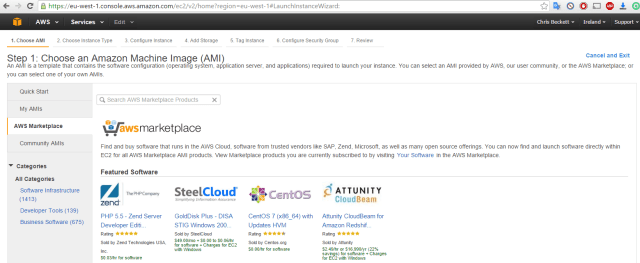
Additionally, instance images are referred to as AMIs, which stands for “Amazon Machine Image”. Similar in concept I suppose to an OVA or OVF. It’s a pre-packaged virtual machine image that can be picked from the service catalog to provision services for end users. As you might expect, AMIs include both Windows and Linux platforms and there is also an AWS Marketplace from where you can trial or purchase pre-packaged AMIs for specific applications or services. In the example screen shot below, you can see that when we go into the “Launch Instance” wizard (think “create a new VM”) we can choose from both Amazon’s service catalog but also the AWS Marketplace. Why re-invent the wheel? If the vendor has pre-packaged it for you, you can trial it and also use it on a pay-as-you-go basis.

aws-2

As you can see above, there is a huge amount from which to pick, and it’s very much the same in concept as the VMware Solution Exchange. What’s notable here is the billing concept. Whereas with vSphere we might be thinking in terms of a one off cost for a licence, with AWS, we need to start thinking about perpetual monthly billing cycles, which will also dictate whether or not AWS is suitable and represents value for money.

You can also take an existing AMI, perform some customisation on it (install your application for example) and then save this as an AMI that you can use to create new instances, but these AMIs are only visible to you, not others. I suppose the closest match to this is a template in vCenter. So again, many similarities, just different terminology and slight differences in workflows etc.

It’s also worth adding at this point before I move properly onto storage that the main storage platform is called EBS, or Elastic Block Storage. It’s Elastic because it can expand and contract, it’s Block because..well, it’s block level storage (think iSCSI, SAN etc.) and Storage because, well it’s storage. At this level, you don’t deal with LUNs and datastores, you just deal with the concept of an unlimited pool of storage, albeit with different definitions. In this sense, it’s similar to the vSphere concept of Storage Profiles.

Storage Profiles can help an administrator place workloads on the appropriate type of storage to ensure consistent and predictable performance. In AWS’s case, you have a choice of three – General Purpose, Provisioned IOPS and Magnetic. More on this in the storage section, but remember that EBS storage is persistent, so when an instance is restarted or powered off, the data remains. You can also add disks to an instance using EBS, for example if you wanted to create a software RAID within your instance.

You may also see references to Instance Storage. This is basically using storage on the host itself, rather than enterprise grade EBS storage. This type of storage is entirely transitory and only lasts for the lifetime of the instance section. Once the instance is powered off or destroyed (terminated in AWS parlance), the storage goes with it. Remember that!

One of the good things about EBS is that in the main, SSD storage is used. General Purpose is SSD and is used for exactly that. Provisioned IOPS is used mainly for high I/O workloads such as databases and messaging servers and Magnetic is spinning disk, so the cheapest of the cheapest and used for workloads with modest I/O requirements.

Amazon S3

So to another service with an exotic hipster name, Amazon S3. This stands for Simple Storage Service and is Amazon’s main storage service. This differs from EBS as it’s an object based file service, rather than block based, which I suppose is more like what vSphere admins are used to.

Amazon refers to S3 locations as “buckets”, and it’s easy to think of them as a bunch of folders. You can have as many buckets as you like and again this storage is persistent. You can upload and download content, set permissions and even publish static websites from an S3 bucket. It’s also worth noting that bucket contents are highly available by way of replication across the region availability zones, but more about that later. By using IAM (Identity and Access Management) you can allow newly provisioned instances to copy content from an S3 bucket say into a web server content directory when they are provisioned, so you are good to go as soon as the instance is.

You can also have versioning, multi-factor authentication and lifecycle policies, but that’s beyond the scope of this article.

It’s not easy to map S3 to a vSphere concept, so we’ll leave it here for now, but at least you know in broad terms what S3 is.

AWS Networking

One thing that AWS does very well (or very frustratingly, depending on your viewpoint) is hiding the complexity of networking  and simplifying into a couple of key concepts and wizards.

In vSphere, we have the concepts of vSwitches, VDSes, port groups, VLAN tags, etc. In AWS, you pick a VPC (more on that later), a subnet and whether or not you want it to have an internet facing IP address. That’s pretty much it.

In terms of configuring the networking environment, when you sign up to AWS you get a default VPC, this stands for “Virtual Private Cloud” and is what is says it is – your own little bubble inside of AWS that nobody can see but you (analogous to a vCloud Director Organisational DC). You can add your own VPCs (up to a limit of 5, for now) if you want to silo off different departments or lines of business, for example. Think of a VPC as your vCenter view, but without clusters. VPCs operate pretty much on a simple, flat management model. If you have a PluralSight sub, it’s a good idea to check out Nigel Poulton’s VPC videos for a much better insight on how this all works.

VPCs don’t talk to each other by default, but you can link them together (and link VPCs from other AWS accounts if you want to). Again, it’s difficult to map this to a vSphere concept,  but this helps explain what a VPC is.

Each instance will get an internal RFC 1918 type network address (say 10.x or 192.168.x, depending how CIDR blocks are configured) and those instances requiring external IP addresses will have this added transparently, so basically NAT because the VM does not know about the external facing address. I know it sounds a bit complicated, but actually it’s not, I’m just not good at explaining it!

Availability Zones

One last concept to cover is Availability Zones (AZ). Generally there are three per region, and right now there are 11 regions worldwide. You can put workloads wherever you like, but if you want to add things like Elastic Load Balancer, you can’t just scatter gun your instances all over the planet.

An AZ in it’s most basic sense is a physical data centre, so easy to understand from a vSphere perspective. However, in AWS, as there are three AZs per region connected together via high speed, low latency network links, services such as S3 and Elastic Load Balancer (ELB) can take advantage of this. The region is the logical boundary for these services and means that S3 data is replicated around all AZs in the region and load balanced services that sit behind a single ELB can be placed in all three AZs if need be. All of this is configured by default, you don’t need to do anything yourself to let this magic happen.

Managing AWS from vCenter

In all the AWS concepts I’ve mentioned so far, I’ve discussed how things are done from the AWS web console. It’s also possible to manage and migrate VMs to AWS from vCenter Server, this is done with the AWS Management Portal. I haven’t yet tried it, but when I do, I’ll come back and write an article about it. This is a key piece of the puzzle though, as it allows “single pane of glass” management for vSphere and AWS.

In Conclusion

Hopefully this has been a useful primer in mapping AWS concepts to vSphere ones. There are lots of services and constructs that are unique to AWS that don’t necessarily map back, but it’s still important to know what they are. I’ve summarised some of the mappings in the table below (and not all of them are directly 1-1 in concept), hopefully I can add more articles in the coming weeks.

Availability Zone = Data Centre (physical)

VPC = Datacenter (vCenter logical)

EBS = Storage Profiles (similar, but not exactly the same)

Instance = Virtual Machine

AMI = OVA/OVF


13-10-15

VMworld Europe Day Two

Today is pretty much the day the whole conference springs to life. All the remaining delegates join the party with the TAM and Partner delegates. The Solutions Exchange opened for business and there’s just a much bigger bustle about the place than there was yesterday.

The opening general session was hosted by Carl Eschenbach, and credit to him for getting straight in there and talking about the Dell deal. I think most are scratching their heads, wondering what this means in the broader scheme of things, but Carl reassured the delegates that it would still be ‘business as usual’ with VMware acting as an independent entity. That’s not strictly true, as they’re still part of the EMC Federation, who are being acquired by Dell, so not exactly the same.

Even Michael Dell was wheeled out to give a video address to the conference to try and soothe any nerves, giving one of those award ceremony ‘sorry I can’t be there’ speeches. Can’t say it changed my perspective much!

The event itself continues to grow. This year there are 10,000 delegates from 96 countries and a couple of thousand partners.

Into the guts of the content, first up were Telefonica and Novamedia. The former are a pretty well known European telco, and the latter are a multinational lottery company. The gist of the chat was that VMware solutions (vCloud, NSX etc) have allowed both companies to bring new services and solutions to market far quicker than previously. In Novamedia’s case, they built 4 new data centres and had them up and running in a year. I was most impressed by Jan from Novamedia’s comment ‘Be bold, be innovative, be aggressive’. A man after my own heart!

VMware’s reasonably new CTO Ray O’Farrell then came out and with Kit Colbert discussed the ideas behind cloud native applications and support for containers. I’ll be honest at this point and say that I don’t get the container hype, but that’s probably due in no small part to my lack of understanding of the fundamentals and the use cases. I will do more to learn more, but for now, it looks like a bunch of isolated processes on a Linux box to me. What an old cynic!

VMware have taken to approaches to support containers. The first is to extend vSphere to use vSphere Integrated Containers and the second is the Photon platform. The issue with containerised applications is that the vSphere administrator has no visibility into them. It just looks and acts like a VM. With VIC, there are additional plug-ins into the vSphere Web Client that allow the administrator to view which processes are in use, on which host and how it is performing. All of this management layer is invisible and non-intrusive to the developer.

The concept of ‘jeVM’ was discussed, which is ‘just enough VM’, a smaller footprint for container based environments. Where VIC is a Linux VM on vSphere, the Photon platform is essentially a microvisor on the physical host, serving up resource to containersa running Photon OS, which is a custom VMware Linux build. The Photon platform itself contains two objects – a controller and the platform itself. The former will be open sourced in the next few weeks (aka free!) But the platform itself will be subscription only from VMware. I’d like to understand how that breaks down a bit better.

VRealize Automation 7 was also announced, which I had no visibility of, so that was a nice surprise. There was a quick demo with Yangbing Li showing off a few drag and drop canvas for advanced service blueprints. I was hoping this release would do away with the need for the Windows IaaS VM(s), but I’m reliably informed this is not the case.

Finally, we were treated with a cross cloud vMotion, which was announced as an industry first. VMs were migrated from a local vSphere instance to a vCloud Air DC in the UK and vice versa. This is made possible by ‘stretching’ the Layer 21 network between the host site and the vCloud Air DC. This link also includes full encryption and bandwidth optimisation. The benefit here is that again, it’s all managed from a familiar place (vSphere Web Client) and the cross cloud vMotion is just the migration wizard with a couple of extra choices for source and destination.

I left the general session with overriding feeling that VMware really are light years ahead in the virtualisation market, not just on premises solutions but hybrid too. They’ve embraced all cloud providers, and the solutions are better for it. Light years ahead of Microsoft in my opinion, and VMware have really raised their game in the last couple of years.

My first breakout session of the day was Distributed Switch Best Practices. This was a pretty good session as I’ve really become an NSX fanboy in the last few months, and VDSes are the bedrock of moving packet between VMs. As such, I noted the following:-

  • DV port group still has a one to one mapping to a VLAN
  • There may be multiple VTEPS on a single host. A DV port group is created for all VTEPs
  • DV port group is now called a logical switch when backed by VXLAN
  • Avoid single point of failure
  • Use separate network devices (i.e switches) wherever possible
  • Up to 32 uplinks possible
  • Recommend 2 x 10v Gbps links,  rather than lots of 1 Gbps
  • Don’t dedicate physical up links for management when connectivity is limited and enable NIOC
  • VXLAN compatible NIC recommended, so hardware offload can be used
  • Configure port fast and BPDU on switch ports, DVS does not have STP
  • Always try to pin traffic to a single NIC to reduce risk of out of order traffic
  • Traffic for VTEPs only using single up link in an active passive configuration
  • Use source based hashing. Good spread of VM traffic and simple configuration
  • Myth that VM traffic visibility is lost with NSX
  • Net flow, port mirroring, VXLAN ping tests connections between VTEPs
  • Trace flow introduced with NSX 6.2
  • Packets are specially tagged for monitoring, reporting back to NSX controller
  • Trace flow is in vSphere Web client
  • Host level packet capture from the CLI
  • VDS portgroup, vmknic or up link level, export as pcap for Wireshark analysis
  • Use DFW
  • Use jumbo frames
  • Mark DSCP value on VXLAN encapsulation for Quality of Service

For my final session of the dayt, I attended The Practical Path to NSX and Network Virtualisation. At first I was a bit dubious about this session as the first 20 minutes or so just went over old ground of what NSX was, and what all the pieces were, but I’m glad I stayed with it, as I got a few pearls of wisdom from it.

  • Customer used NSX for PCI compliance, move VM across data center and keep security. No modification to network design and must work with existing security products
  • Defined security groups for VMs based on role or application
  • Used NSX API for custom monitoring dashboards
  • Use tagging to classify workloads into the right security groups
  • Used distributed objects, vRealize for automation and integration into Palo Alto and Splunk
  • Classic brownfield design
  • Used NSX to secure Windows 2003 by isolating VMs, applying firewall rules and redirecting Windows 2003 traffic to Trend Micro IDS/IPS
  • Extend DC across sites at layer 3 using encapsulation but shown as same logical switch to admin
  • Customer used NSX for metro cluster
  • Trace flow will show which firewall rule dropped the packet
  • VROps shows NSX health and also logical and physical paths for troubleshooting

It was really cool to see how NSX could be used to secure Windows 2003 workloads that could not be upgraded but still needed to be controlled on the network. I must be honest, I hadn’t considered this use case, and better still, it could be done with a few clicks in a few minutes with no downtime!

NSX rocks!


12-10-15

VMworld Europe Day One

Today saw the start of VMworld Europe in Barcelona, with today being primarily for partners and TAM customers (usually some of the bigger end users). However, that doesn’t mean that the place is quiet, far from it! There are plenty of delegates already milling around, I saw a lot of queues around the breakout sessions and also for the hands on labs.

As today was partner day, I already booked my sessions on the day they were released. I know how quickly these sessions fill, and I didn’t want the hassle of queuing up outside and hoping that I would get in. The first session was around what’s new in Virtual SAN. There have been a lot of press inches given to the hyper converged storage market in the last year, and I’ve really tried to blank them out. Now the FUD seems to have calmed down, it’s good to be able to take a dispassionate look at all the different offerings out there, as they all have something to give.

My first session was with Simon Todd and was titled VMware Virtual SAN Architecture Deep Dive for Partners. 

It was interesting to note the strong numbers of customer deploying VSAN. There was a mention of 3,000 globally, which isn’t bad for a product that you could argue has only just reached a major stage of maturity. There was the usual gratuitous customer logo slide, one of which was of interest to me. United Utilities deal with water related things in the north west, and they’re a major VSAN customer.

There were other technical notes, such as VSAN being an object based file system, not a distributed one. One customer has 14PB of storage over 64 nodes, and the limitation to further scaling out that cluster is a vSphere related one, rather than a VSAN related one.

One interesting topic of discussion was whether or not to use passthrough mode for the physical disks. What this boils down to is the amount of intelligence VSAN can gather from the disks if they are in passthrough mode. Basically, there can be a lot of ‘dialog’ between the disks and VSAN if there isn’t a controller in the way. I have set it up on IBM kit in our lab at work, and I had to set it to RAID0 as I couldn’t work out how to set it to passthrough. Looks like I’ll have to go back to that one! To be honest, I wasn’t getting the performance I expected, and that looks like it’s down to me.

VSAN under the covers seems a lot more complex than I thought, so I really need to have a good read of the docs before I go ahead and rebuild our labs.

There was also an interesting thread on troubleshooting. There are two fault types in VSAN – degraded and absent. Degraded state is when (for example) an SSD is wearing out, and while it will still work for a period of time, performance will inevitably suffer and the part will ultimately go bang. Absent state is where a temporary event has occured, with the expectation that this state will be recovered from quickly. Examples of this include a host (maintenance mode) or network connection down and this affects how the VSAN cluster behaves.

There is also now the ability to perform some proactive testing, to ensure that the environment is correctly configured and performance levels can be guaranteed. These steps include a ‘mock’ creation of virtual machines and a network multicast test. Other helpful troubleshooting items include the ability to blink the LED on a disk so you don’t swap out the wrong one!

The final note from this session was the availability of the VSAN assessment tool, which is a discovery tool run on customer site, typically for a week, that gathers existing storage metrics and provides sizoing recommendations and cost savings using VSAN. This can be requested via a partner, so in this case, Frontline!

The next session I went to was Power Play :What’s New With Virtual SAN and How To Be Successful Selling It. Bit of a mouthful I’ll agree, and as I’m not much of a sales or pre-sales guy, there wasn’t a massive amount of takeaway for me from this session, but Rory Choudhari took us through the current and projected revenues for the hyperconverged market, and they’re mind boggling.

This session delved into the value proposition of Virtual SAN, mainly in terms of costs (both capital and operational) and the fact that it’s simple to set up and get going with. He suggested it could live in harmony with the storage teams and their monolithic frames, I’m not so sure myself. Not from a tech standpoint, but from a political one. It’s going to be difficult in larger, more beauracratic environments.

One interesting note was Oregon State University saving 60% using Virtual SAN as compared to refreshing their dedicated storage platform. There are now nearly 800 VASN production customers in EMEA, and this number is growing weekly. Virtual SAN6.1 also brings with it support for Microsoft and Oracle RAC clustering. There is support for OpenStack, Docker and Photon and the product comes in two versions.

If you need an all flash VSAN and/or stretched clusters, you’ll need the Advanced version. For every other use case, Standard is just fine.

After all the VSAN content I decided to switch gears and attend an NSX session called  Disaster Recovery with NSX, SRM and vRO with Gilles Chekroun. Primarily this session seemed to concentrate on the features in the new NSX 6.2 release, namely the universal objects now available (distributed router, switch, firewall) which span datacentres and vCenters. With cross vCenter vMotion, VMware have really gone all out removing vCenter as the security or functionality boundary to using many of their products, and it’s opened a whole new path of opportunity, in my opinion.

There are currently 700 NSX customers globally, with 65 paying $1m or more in their deployments. This is not just licencing costs, but also for integration with third party products such as Palo Alto, for example. Release 6.2 has 20 new features and has the concept of primary and secondary sites. The primary site hosts an NSX Manager appliance and the controller cluster, and secondary sites host only an NSX Manager appliance (so no controller clusters). Each site is aware of things such as distributed firewall rules, so when a VM is moved from one site to another, the security settings arew preserved.

Locale IDs have also been added to provide the ability to ‘name’ a site and use the ID to direct routing traffic down specific paths, either locally on that site or via another site. This was the key takeway from the session that DRis typically slow, complex and expensive, with DR tests only being invoked annually. By providing network flexibility between sites and binding in SRM and vRO for automation, some of these issues go away.

In between times I sat the VCP-CMA exam for the second time. I sat the beta release of the exam and failed it, which was a bit of a surprise as I thought I’d done quite well. Anyway, this time I went through it, some of the questions from the beta were repeated and I answered most in the same way and this time passed easily with a 410/500. This gives me the distinction of now holding a full house of current VCPs – cloud, desktop, network and datacenter virtualisation. Once VMware Education sort out the cluster f**k that is the Advanced track, I hope to do the same at that level.

Finally I went to a quick talk called 10 Reasons Why VMware Virtual SAN Is The Best Hyperconverged Solution. Rather than go chapter and verse on each point I’ll list them below for your viewing pleasure:-

  1. VSAN is built directly into the hypervisor, giving data locality and lower latency
  2. Choice – you can pick your vendor of choice (HP, Dell, etc.) And either pick a validated, pre-built solution or ‘roll your own’ from a list of compatible controllers and hard drives from the VMware HCL
  3. Scale up or scale out, don’t pay for storage you don’t need (typically large SAN installations purchase all forecasted storage up front) and grow as you go by adding disks, SAS expanders and hosts up to 64 hosts
  4. Seamless integration with the existing VMware stack – vROps adapters already exist for management, integration with View is fully supported etc
  5. Get excellent performance using industry standard parts. No need to source specialised hardware to build a solution
  6. Do more with less – achieve excellent performance and capacity without having to buy a lot of hardware, licencing, support etc
  7. If you know vSphere, you knopw VSAN. Same management console, no new tricks or skills to learn with the default settings
  8. 2000 customers using VSAN in their production environment, 65% of whom use it for business critical applications. VSAN is also now third generation
  9. Fast moving road map – version 5.5 to 6.1 in just 18 months, much faster rate of innovation than most monolithic storage providers
  10. Future proof – engineered to work with technologies such as Docker etc

All in all a pretty productive day – four sessions and a new VCP for the collection, so I can’t complain. Also great to see and chat with friends and ex-colleagues who are also over here, which is yet another great reason to come to VMworld. It’s 10,000 people, but there’s still a strong sense of community.